How to connect fleet rotation schedules to mobile detailing
October 6, 2026 · 11 min read · Frogman Detailing

Instead of chasing drivers and arranging cleaning after every rotation change, connect your fleet rotation mobile detailing schedule to a shared vehicle sheet and a confirmed calendar appointment. Keep dispatch availability, vehicle access, and detailer confirmation separate so a calendar reminder never gets mistaken for a booking.
TL;DR
- A fleet rotation mobile detailing schedule needs confirmed downtime, vehicle access, and a confirmed appointment.
- Use Google Sheets for vehicle rotation details and Google Calendar for confirmed mobile detailing appointments.
- Frogman Detailing serves driveway customers across the Oklahoma City metro, including Edmond and Arcadia.
- A rotation change should trigger a review, not an automatic appointment move.
Why the rotation sheet comes first
A vehicle returning to the yard is not necessarily ready for cleaning. The driver might need it again, the keys might leave with someone else, or the next assignment might start before the work is finished. An empty calendar square does not settle any of that.
Frogman Detailing is best for Oklahoma City metro customers who want mobile detailing at their driveway. The veteran-owned service details cars, trucks, and motorcycles, including in Edmond and Arcadia. Start with Frogman Detailing to discuss the vehicles, location, and proposed work before building appointments around the service.
This guide uses Google Sheets and Google Calendar. It is a shared-sheet workflow, not a software integration that books a detailer automatically. You control the handoff. That extra confirmation is useful when dispatch changes faster than the cleaning schedule.
For your 2026 schedule, build around actual vehicle downtime. Do not start by filling every open slot.
Before you start
- Get editing access. You need a Google account, a shared Google Sheets file, and permission to create or edit events on the calendar your coordinator uses. Give dispatch access to the rotation sheet.
- Gather the vehicle details. Record the vehicle identifier, return time, next assignment, cleaning need, service location, and person responsible for keys. Confirm site permission and discuss workspace, water, electricity, and access requirements with the detailer.
- Separate requests from bookings. A spreadsheet row or calendar event does not reserve service. Confirm the appointment and work scope with the detailer before dispatch treats that downtime as committed.
Use one coordinator for appointment changes. Other staff can report rotation changes, but someone needs clear responsibility for checking the appointment and telling everyone what changed. Otherwise, you get three versions of the truth and one truck heading out the gate.
Vehicle rotation sheet
Build the working record
- Open Google Sheets. Select Blank spreadsheet and name the file something clear, such as Fleet Detailing Schedule 2026.
- Add these column headings: Vehicle ID, Rotation return, Next assignment, Service location, Cleaning need, Key contact, Appointment status, Appointment time, Calendar link, and Last updated. These are labels you create, not built-in software fields.
- Use 1 row per vehicle in the active planning sheet. Keep the vehicle identifier consistent with dispatch records. Do not alternate between a unit number, a driver's name, and a nickname.
- Enter full dates and times for the return and next assignment. Write the location plainly. Include the parking area or access instructions when the street address alone is not enough.
- Select Share and give the coordinator and relevant dispatch staff the access they need. Avoid sharing driver schedules more broadly than the job requires.
Expected result: Each active vehicle has a clear record of when it returns, when it leaves, what needs cleaning, and who can provide access.
Keep completed work in a separate history sheet rather than overwriting it. Record the vehicle, completion date, work performed, and any follow-up issue. Your next scheduling decision should use what actually happened, not what last month's plan said would happen.
Downtime and service scope
Decide which vehicles are ready to schedule
- Compare Rotation return with Next assignment. Identify the period when dispatch can release the vehicle. Include time for access, the agreed work, and any drying or handoff requirements the detailer identifies.
- Describe the condition in Cleaning need. Write useful observations such as dirty floor mats, dog hair on rear seats, or mud on the exterior. Avoid vague instructions like make it nice.
- Ask the detailer to confirm the appropriate work and required appointment window. Do not assign a cleaning duration based only on vehicle size or another vehicle's last visit.
- Use 3 status labels in Appointment status: Needs review, Requested, and Confirmed. Move a vehicle to Requested after sending the proposed time and scope. Use Confirmed only after receiving acceptance.
- Keep vehicles with uncertain return times at Needs review. Resolve that uncertainty with dispatch before offering the time to the detailer.
Expected result: Only vehicles with a usable downtime window and a clear cleaning request move toward booking.
These status labels describe scheduling, not completion. Record completion separately so a finished appointment cannot be confused with an upcoming one.
For the 2026 plan, let vehicle condition determine the work. Do not give every vehicle the same cleaning request just because matching rows look tidy. A work truck and a lightly used passenger car do not necessarily need the same attention.
Confirmed appointment calendar
Turn an accepted request into a calendar event
- In Google Calendar, select Create, then Event. Use a title that identifies the vehicle and purpose, such as Unit A: Mobile detailing. Unit A is an example, not a required naming convention.
- Enter the confirmed date, start time, and agreed end time. Select the calendar used by the coordinator. Make sure dispatch can see the relevant event or receives a separate vehicle hold notice.
- Fill Location with the agreed service address. In Description, add the vehicle identifier, cleaning scope, key contact, access instructions, and the confirmation details.
- Use Add guests for staff who need the appointment. Add the detailer only if that invitation method has been agreed. Sending an invitation is not a substitute for booking.
- Select Save. Open the saved event, copy its browser address into Calendar link, and enter the appointment time in the sheet. Keep sensitive access information out of widely shared calendars.
Expected result: The calendar shows an accepted appointment, and the sheet points to that same event. Dispatch knows which vehicle is committed and where the keys will be.
Create the event after confirmation, not before. Draft requests belong in the sheet. This keeps an unaccepted request from looking like a promise to the next driver.
For recurring work, agree on the arrangement before creating repeating calendar events. A repeating reminder does not establish a standing service agreement.
Rotation change handoff
Keep dispatch changes from breaking the appointment
- Require dispatch to update Rotation return, Next assignment, and Last updated whenever an assignment changes. The coordinator should review affected appointments rather than assuming the calendar remains correct.
- Run 2 checks before each visit: confirm the vehicle's downtime with dispatch, then confirm keys and site access with the responsible person. Set the timing of those checks with your team and detailer.
- If the new rotation conflicts with the appointment, return Appointment status to Needs review. Contact the detailer before moving the accepted event. Keep the existing appointment visible until the change is settled.
- After everyone accepts the replacement time, update the event and sheet together. Tell the key contact and dispatch which arrangement now applies.
- After the work, record completion and inspect the result against the agreed scope. Release the vehicle according to the agreed handoff and any drying requirements.
Expected result: A rotation change prompts a clear review, and an accepted appointment changes only after the people involved agree.
The sequence is simple: Review rotation, Confirm access, Confirm appointment, Record completion. Keep those handoffs visible in your 2026 operating checklist. Memory is not a scheduling system.
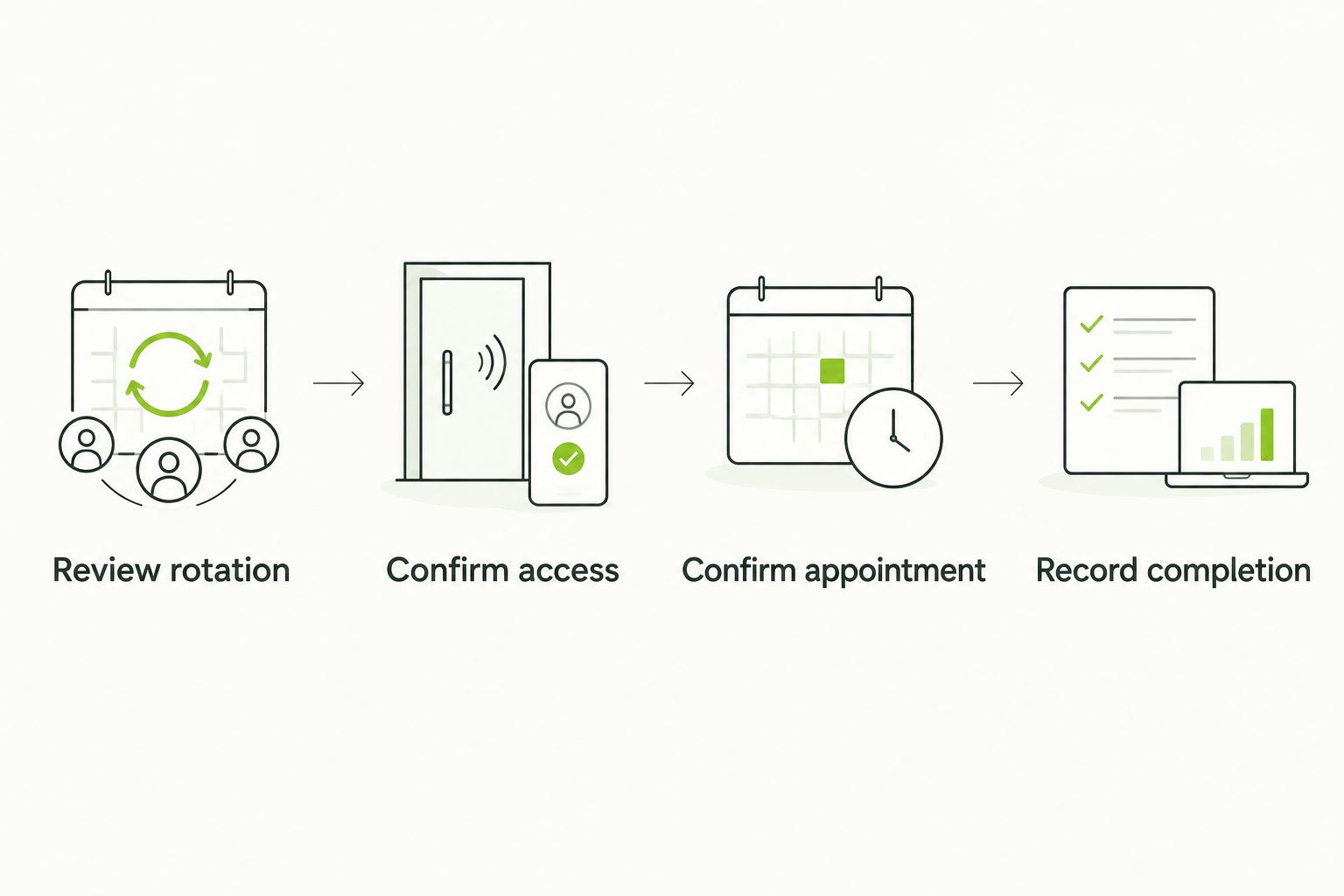
A vehicle rotation update starts a review. It does not confirm an appointment.
When the rotation changes instead of repeating
A fixed rotation works well with a regular review of upcoming appointments. An irregular rotation needs a different trigger: dispatch updates the vehicle record, then the coordinator evaluates the new downtime window. Neither workflow needs to move appointments automatically.
| Workflow | Best for | Main benefit | Main drawback |
|---|---|---|---|
| Regular review | Vehicles with predictable return periods | Keeps proposed cleaning aligned with known downtime | A late dispatch change still needs a separate review |
| Change-triggered review | Vehicles with shifting assignments | Starts scheduling from the latest rotation information | Depends on staff reporting changes promptly |
For a change-triggered review, require the person editing the rotation to notify the coordinator. Use your existing internal communication channel. A changed cell that nobody sees is not a handoff.
The coordinator checks the new return and departure times, updates the cleaning request if needed, and asks the detailer about the proposed window. Only an accepted request becomes a confirmed appointment. Keep that rule even when the change looks minor.
If you later automate notifications, automate the alert first. Do not automate booking or rescheduling until the workflow includes detailer acceptance, site access, and dispatch approval. A faster mistake is still a mistake.
Troubleshooting the schedule
The calendar shows a booking that was never accepted
Return the sheet status to Requested and contact the detailer. Remove the implication that service is confirmed, and tell dispatch the vehicle hold is provisional. Calendar guests and reminders do not establish acceptance.
The vehicle leaves before the detailer arrives
Review the latest dispatch assignment against the appointment. Identify who owns the vehicle release decision, then require that person's approval before confirming replacement work. Do not fill the slot with another vehicle without agreeing on its scope and timing.
The keys or service space are missing
Assign a named key contact and confirm where that person will be. Check parking permission, working space, and equipment requirements before the visit. Use the guide to mobile detailing water and electricity requirements to prepare that conversation, not to assume what equipment a provider brings.
Two records disagree about the appointment
Treat the detailer's latest accepted arrangement as the appointment reference. Update the sheet and calendar together, then notify dispatch and the key contact. Archive obsolete records rather than leaving competing events visible.
Cleaning is marked finished while the vehicle still needs a handoff
Separate work completion from release to dispatch. Follow the agreed inspection and drying instructions before returning the vehicle to service. Clean upholstery and ready-to-drive upholstery are not automatically the same thing.
Customize the workflow without making it harder
Start the 2026 workflow with the fields your team will actually maintain. Add a condition photo, access note, or completion record when it answers a recurring question. Skip columns that nobody uses.
Keep cleaning tasks distinct from mechanical maintenance and safety inspections. A detail removes dirt. It does not certify brakes, repair damage, or clear a warning light. Route those issues through the appropriate maintenance process.
When discussing mobile detailing with Frogman Detailing, explain the vehicle type, condition, proposed location, and downtime window. The service comes to customers' driveways across the Oklahoma City metro. Confirm whether your proposed fleet location and scheduling arrangement fit before committing dispatch resources.
The benefit is avoiding a separate trip to a detailing location. The limitation is that on-site work still depends on suitable access, an agreed scope, and a confirmed appointment. Your sheet cannot solve those conditions by itself.
Discuss your detailing schedule
Explain the vehicles, service location, and downtime window before building your calendar.
FAQ
How do I connect a fleet rotation schedule to mobile detailing?
Use a shared vehicle sheet to track return times, next assignments, cleaning needs, and access. Create a calendar appointment only after the detailer accepts the proposed time and work.
Can Google Calendar automatically book a mobile detailer?
A Google Calendar event does not book a mobile detailer by itself. Agree on the appointment through the provider's booking process, then record the accepted arrangement in the calendar.
Should I schedule detailing before or after a vehicle rotation?
Schedule detailing during a confirmed downtime window between the vehicle's return and its next assignment. Include the agreed work, access, drying, and handoff requirements rather than treating the entire gap as cleaning time.
What happens when dispatch changes the rotation?
A dispatch change should trigger an appointment review. Contact the detailer before moving an accepted appointment, then update the sheet, calendar, and key contact together.
Do I need special fleet scheduling software?
You can use a shared spreadsheet and calendar for the workflow described here. The essential controls are consistent vehicle identifiers, a responsible coordinator, and confirmation before booking or rescheduling.
Can I book every fleet vehicle for the same cleaning work?
Choose the work from each vehicle's condition and intended use. Describe the dirt, stains, hair, or exterior buildup, then agree on the scope and appointment window with the detailer.
Does Frogman Detailing come to customers in Edmond and Arcadia?
Frogman Detailing provides mobile car, truck, and motorcycle detailing at customers' driveways throughout the Oklahoma City metro, including Edmond and Arcadia. Discuss the proposed location and appointment directly before placing it on your fleet calendar.
One last thing
Record the next assignment before requesting the cleaning appointment. That departure time is the constraint that matters. Without it, a tidy calendar can still strand dispatch with a vehicle that is not ready.
For your next 2026 scheduling review, ask one blunt question: who has the keys when the detailer arrives? If nobody has a clear answer, fix that before anything else. The crumbs can wait. The handoff cannot.
Related guides
Frogman comes to your driveway across the Oklahoma City metro.